Soft Keys Beta - Back Buttons11.0
Publisher Description
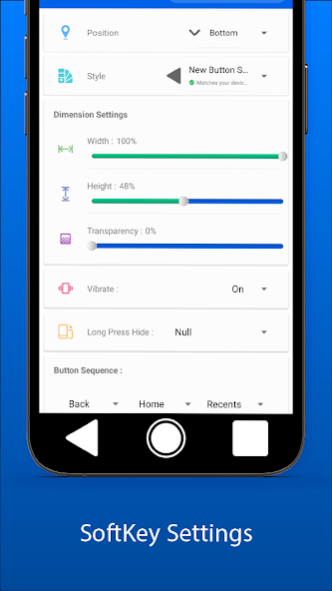
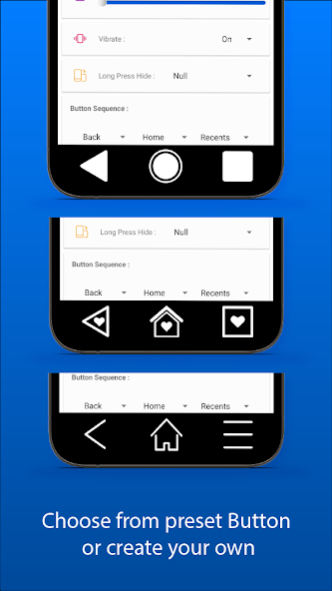


The SoftKey Beta - Back Key Buttons.
If the physical buttons of your phone can not work correctly,
Back Buttons can continue to operate your phone with simulating the same as the system button.
Multiple customization options to change navigation bar back button color and back Key button design on the App.
It is easy to use the navigation bar button.
🎨
Back Key Features:
- One Touch-hide navigation bar with user-select duration.
- You can swipe up on the lines or hide them with Gesture hints.
- Touch vibration automatically a small vibration.
- You can customize the Buttons Key height, width, transparency size.
- You can change the Position Top Key Button, Bottom Key Button, Left Key Button, Right Key Button.
- Long Press Back Key button changes the position option.
- 35+ Android and IOS Button style themes.
- Change the Back Key Button sequence.
- Day/Night theme mode.
📌
How to use SoftKeys Beta - Home Back Key Button ?
Step 1: If you see Draw overlay Button, tap it
Step 2: You need to find the SoftKey Beta Back key Buttons app and enable it. I returned to this App.
Step 3: Tap Accessibility Service Button.
Step 4: Find the SoftKey Beta - Back Key Buttons app. To accept the permissions, tap OK.
🎬
Back Key Button - Help Video:
https://www.technovimal.in/how-to-use-softkeys-beta-apps.html
If you have any problems, please send me a mail. enjoy it :)
Email: vimalcvs29@gmail.com
About Soft Keys Beta - Back Buttons
The company that develops Soft Keys Beta - Back Buttons is Vimal CVS. The latest version released by its developer is 11.0.
To install Soft Keys Beta - Back Buttons on your Android device, just click the green Continue To App button above to start the installation process. The app is listed on our website since 2021-01-04 and was downloaded 27 times. We have already checked if the download link is safe, however for your own protection we recommend that you scan the downloaded app with your antivirus. Your antivirus may detect the Soft Keys Beta - Back Buttons as malware as malware if the download link to com.vimalcvs.softkeysimple is broken.
How to install Soft Keys Beta - Back Buttons on your Android device:
- Click on the Continue To App button on our website. This will redirect you to Google Play.
- Once the Soft Keys Beta - Back Buttons is shown in the Google Play listing of your Android device, you can start its download and installation. Tap on the Install button located below the search bar and to the right of the app icon.
- A pop-up window with the permissions required by Soft Keys Beta - Back Buttons will be shown. Click on Accept to continue the process.
- Soft Keys Beta - Back Buttons will be downloaded onto your device, displaying a progress. Once the download completes, the installation will start and you'll get a notification after the installation is finished.
Program Details
System requirements
Download information
Pricing
Version History
version 11.0
posted on 2021-01-04
🎨30+ Premium Button Totality Free.
📲New Android and IOS Button Style Theme.
🌗Auto Hide and Day/Night Theme
😎This UI is easy to use.
📌Updated Assistant Design.
📍Bug-Fix, Reduce App Size.
